import sympy as sp

x = sp.symbols("x")
expr = (x + 1)**2
expr
\(\displaystyle \left(x + 1\right)^{2}\)
After this lesson you should be able to create SymPy symbols, distinguish expressions from equations, use common symbolic commands, solve and check equations, inspect restrictions, make tables and plots, and compare SymPy with browser symbolic tools.
A numeric calculator gives decimal values. A symbolic system keeps exact expressions and manipulates formulas. SymPy is a Python computer algebra system. It helps you check and explore, but you still decide the domain and meaning.
import sympy as sp
x = sp.symbols("x")
expr = (x + 1)**2
expr\(\displaystyle \left(x + 1\right)^{2}\)
Use * for multiplication and ** for powers. Write 2*x, not 2x; write x**2, not x^2.
expr = 2*x + 3
equation = sp.Eq(2*x + 3, 11)
expr, equation
(2*x + 3, Eq(2*x + 3, 11))In Python, = assigns a name. A mathematical equation uses sp.Eq(left, right).
| Task | SymPy command | Meaning |
|---|---|---|
| Expand | sp.expand(expr) |
multiply out |
| Factor | sp.factor(expr) |
write as product |
| Simplify | sp.simplify(expr) |
try a simpler equivalent form |
| Cancel | sp.cancel(expr) |
simplify rational expression |
| Together | sp.together(expr) |
combine rational terms |
expr = (x + 2)*(x - 3)
sp.expand(expr), sp.factor(x**2 - x - 6)
(x**2 - x - 6, (x - 3)*(x + 2))rational_expr = (x**2 - 1)/(x - 1)
sp.cancel(rational_expr)\(\displaystyle x + 1\)
The result x + 1 needs a warning: the original expression excludes x = 1.
sp.solve(sp.Eq(3*x - 7, 11), x)[6]sp.solve(x**2 - 5*x + 6, x)[2, 3]sp.checksol(sp.Eq(3*x - 7, 11), x, 6)TrueFor radical equations, checking prevents extraneous answers.
radical_equation = sp.Eq(sp.sqrt(x + 5), x - 1)
[(candidate, sp.checksol(radical_equation, x, candidate)) for candidate in sp.solve(radical_equation, x)]
[(4, True)]Use sp.denom to inspect rational restrictions:
expr = (x**2 - 9)/(x**2 - x - 6)
denominator = sp.denom(expr)
sp.factor(denominator), sp.solve(sp.Eq(denominator, 0), x)
((x - 3)*(x + 2), [-2, 3])For logs, require positive inputs. For even roots, require nonnegative radicands. Assumptions can help, but beginners should first write restrictions in words.
sp.sqrt(2), sp.Rational(1, 3), sp.N(sp.sqrt(2))(sqrt(2), 1/3, 1.41421356237310)Exact values are usually better during algebra. Decimals are useful for final interpretation.
from edumath.algebra import expression_table, function_scene

expression_table("x**2 - 3*x + 2", inputs=(-1, 0, 1, 2, 3, 4))
((-1.0, 6.0), (0.0, 2.0), (1.0, 0.0), (2.0, 0.0), (3.0, 2.0), (4.0, 6.0))scene = function_scene("x**2 - 3*x + 2", x_min=-2, x_max=5, y_min=-2, y_max=8)
fig, ax = scene.render()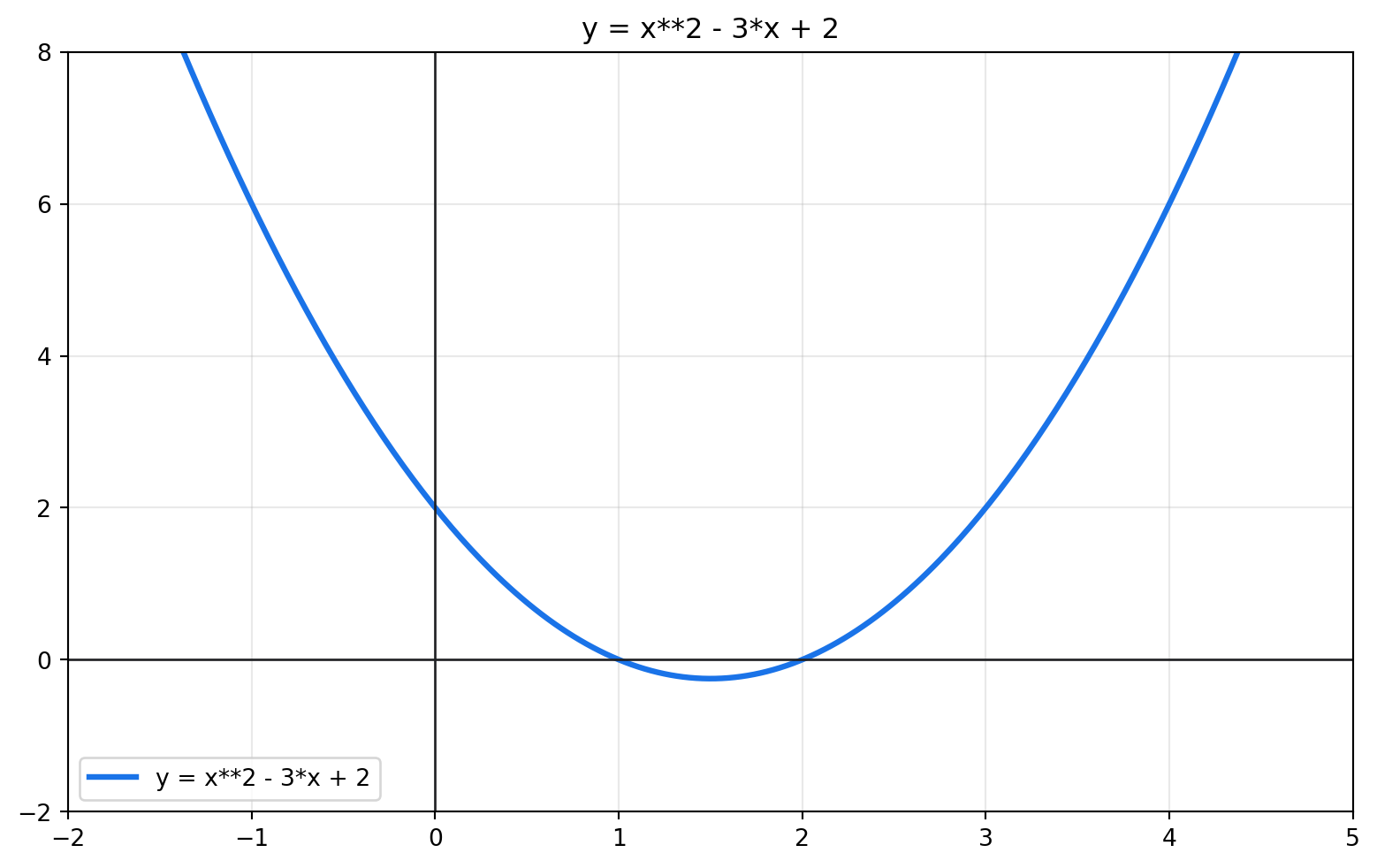
A PyScript sandbox could load SymPy using a package configuration. Verify the exact current PyScript syntax before publishing a live sandbox.
t.(x + 3)^2.(x + 3)^2.x^2 - 7x + 12.4x - 9 = 15.x = 4 solves x^2 - 7x + 12 = 0.(x + 1)/(x - 5).(x^2 - 1)/(x - 1) needs a warning.t = sp.symbols("t").(x + 3)**2.x**2 + 6*x + 9.(x - 4)*(x - 3).x = 6.0.x - 5.x = 1.Symbolic computation is powerful when you know what question you are asking. Guess the command, run it, and then interpret the result mathematically.
Guess first. Should x be typed as a Python string or a SymPy symbol before building x^2 + 1?
Guided exercise.
import sympy as sp
x = sp.Symbol("x")
expr = x**2 + 1
The expression is symbolic, so SymPy can expand, factor, differentiate later, and substitute exact values.
Checkpoint. Create symbols a and b, then build the expression (a + b)^2. Which SymPy command expands it?
Guess first. Is x**2 - 4 an equation by itself?
Guided exercise.
expr = x**2 - 4          # expression
Eq(expr, 0)              # equation
An expression can be simplified or factored. An equation can be solved.
Checkpoint. Write a SymPy equation for 3x + 2 = 11. Then solve it.
Guess first. Why should you check a symbolic answer after solving?
Guided exercise.
solve gives candidates
checksol tests candidates in the original equation
This matters especially for rational and radical equations, where restrictions or squaring can create invalid candidates.
Checkpoint. Solve sqrt(x + 5) = x - 1 with SymPy, then check each solution in the original equation.
Guess first. Which is more informative: sqrt(2) or 1.41421356?
Guided exercise.
Exact forms preserve structure. Decimal approximations help with measurement and graphing. Use exact answers while solving, then approximate when interpreting.
Checkpoint. Compute an exact value for log(5) and then a decimal approximation. State when each form is useful.
The solver layer expects SymPy objects. If a student starts with typed text, parse it first, then solve the parsed equation.
from edumath.core import parse_equation
from edumath.solvers import solve_equation_steps

parsed = parse_equation("3x + 2 = 11")
solution = solve_equation_steps(parsed)
print(solution.render_text())
Answer: x = 3
Method: linear equation
Steps:
1. Original equation:
Eq(3*x + 2, 11)
2. Move everything to one side:
Eq(3*x - 9, 0)
This writes the equation in the form ax + b = 0.
3. Move the constant term:
Eq(3*x, 9)
4. Divide by the coefficient of the variable:
Eq(x, 3)
Check:
x = 3: validimport sympy as sp
x = sp.symbols("x")
expr = (x + 2)*(x - 3)
sp.expand(expr), sp.factor(sp.expand(expr))(x**2 - x - 6, (x - 3)*(x + 2))equation = sp.Eq(sp.sqrt(x + 5), x - 1)
candidates = sp.solve(equation, x)
[(candidate, sp.checksol(equation, x, candidate)) for candidate in candidates][(4, True)]from edumath.algebra import expand_question
question = expand_question((x + 1)**2)
question.check("x**2 + 2*x + 1").message'Correct.'